How to turn the section on
CRM is in every plan; each item is opened by its own permission of the «CRM» group, while «News», «Brands» and «Partners» use permissions of other groups.
The CRM group does not depend on the plan or on apps: it is part of every plan and is not bought separately. Which items an employee sees is decided only by the permissions of their position.
Menu item — what an employee needs
- Customers
- The «Customers» permission in the «CRM» group — at least «View».
- Bonus Program, Discount System
- The «Loyalty program» permission in the «CRM» group — at least «View».
- Segments
- The «Segments» permission in the «CRM» group — at least «View».
- Promotions, Achievements, Challenges, Mini Games
- The «Promotions» permission in the «CRM» group — at least «View».
- Promo Codes
- The «Promo codes» permission in the «CRM» group — at least «View».
- Coupons
- The «Coupons» permission in the «CRM» group — at least «View».
- Reviews
- The «Reviews» permission in the «CRM» group — at least «View».
- Notifications
- The «Notifications» permission in the «CRM» group — at least «View».
- Banners
- The «Banners» permission in the «CRM» group — at least «View».
- Fraud Prevention, CRM Analytics
- The «CRM analytics» permission in the «CRM» group — at least «View».
- News
- The «System settings» permission in the «Settings» group — at least «View». News is published in the online store and the apps, but the item does not need the «Online store» module.
- Brands, Partners
- The «Menu and products» permission in the «Catalog» group — at least «View». In CRM only for restaurants and car washes; a store has these items in the «Catalog» group.
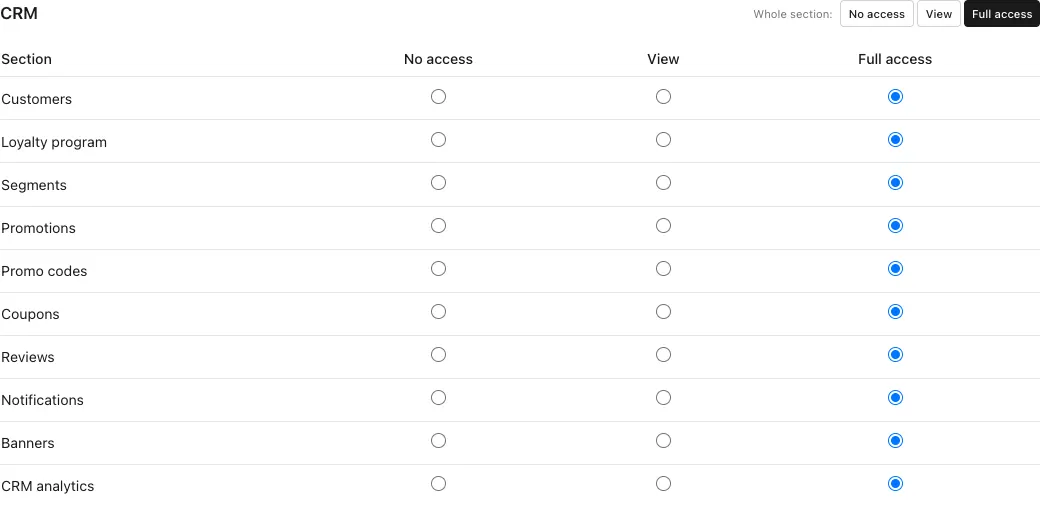
How to give an employee access
- Open Access → Positions (this item is visible only to the organization owner) and open the employee’s position for editing.
- In the «Admin panel access» block find the «CRM» group and choose «View» (read only) or «Full access» (create and change) in the rows you need.
- Press «Save changes».
- The employee reloads the page and the items appear in the menu. With «No access» the item is hidden, and a direct link to the page redirects to the first available page of the menu (usually «Dashboard»).