How to turn the section on
The group is visible only while the «Finance and accounting» module (from the «Enterprise» plan) is active.
The Finance group appears in the menu only while the «Finance and accounting» add-on module is active (29.28 USD per month, «Available from plan: Enterprise»; it is not part of any plan). Without the module the server rejects finance requests with error 402.
How to connect the module
- Open Billing → Plans and scroll down to the «Additional modules» section.
- In the «Prepaid term» list on the right choose how many months to pay for, then press «Connect» on the «Finance and accounting» card.
- An unpaid invoice is created and its payment page opens — pay the invoice (see the «How to pay an invoice» topic in the «Billing» section).
- After payment the card shows «Connected»; reload the page and the section appears in the menu.
Menu item — what an employee needs
- Cash Shifts
- The «Cash register shifts» permission in the «Finance» group — at least «View».
- Transactions, Expenses
- The «Transactions» permission in the «Finance» group — at least «View».
- Cash Flow
- The «Cash flow» permission in the «Finance» group — at least «View».
- P&L Report, Balance
- The «P&L report» permission in the «Finance» group — at least «View».
- Financial KPIs
- The «Financial KPIs» permission in the «Finance» group — at least «View».
- Financial Accounts
- The «Bank accounts» permission in the «Finance» group — at least «View».
- Receivables
- The «Receivables» permission in the «Finance» group — at least «View».
- Payables
- The «Payables» permission in the «Finance» group — at least «View».
- Taxes
- The «Taxes» permission in the «Finance» group — at least «View».
- Payment Methods
- The «Billing and subscription» permission in the «Settings» group — at least «View».
Important: Only the end of the module hides the group (paid period + 3 days); the «Finance» card in Apps does not affect the menu. Data is kept and is visible again after the module is renewed.
How to give an employee access
- Open Access → Positions (this item is visible only to the organization owner) and open the employee’s position for editing.
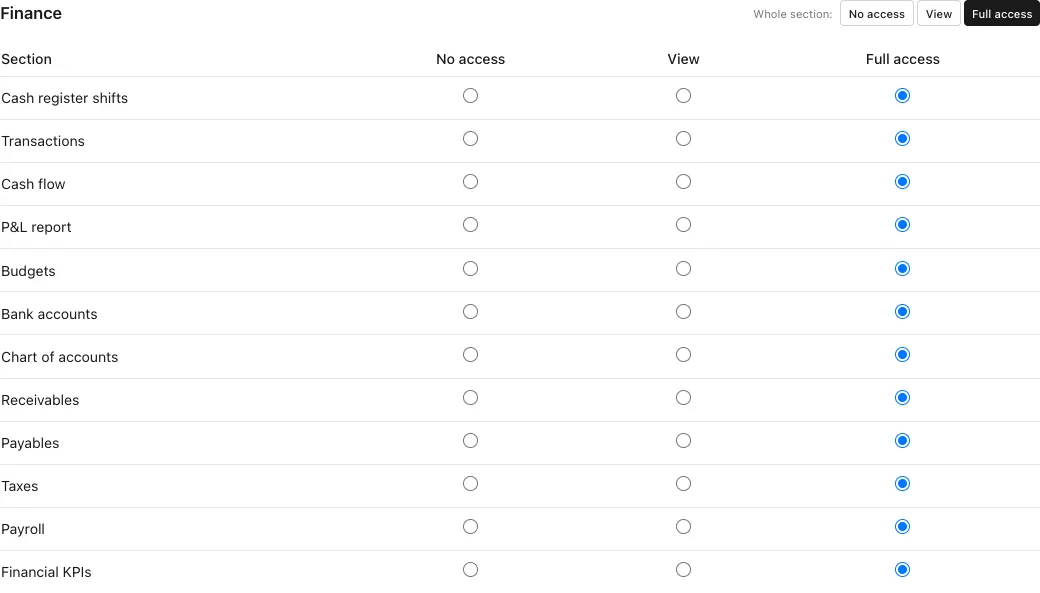
- In the «Admin panel access» block find the «Finance» group and choose «View» (read only) or «Full access» (create and change) in the rows you need.
- Press «Save changes».
- The employee reloads the page and the items appear in the menu. With «No access» the item is hidden, and a direct link to the page redirects to the first available page of the menu (usually «Dashboard»).