Plum
Uzcard and Humo card payments via Plum: login, password and an optional API address.
Open in the admin panel/apps/plum/settings Plum is a service for accepting payments by local Uzcard and Humo cards. One product and no webhook address — Centro calls Plum itself. The app is free.
How to open
- In the sidebar, expand the Apps group — it lists the connected apps.
- Click «Plum».
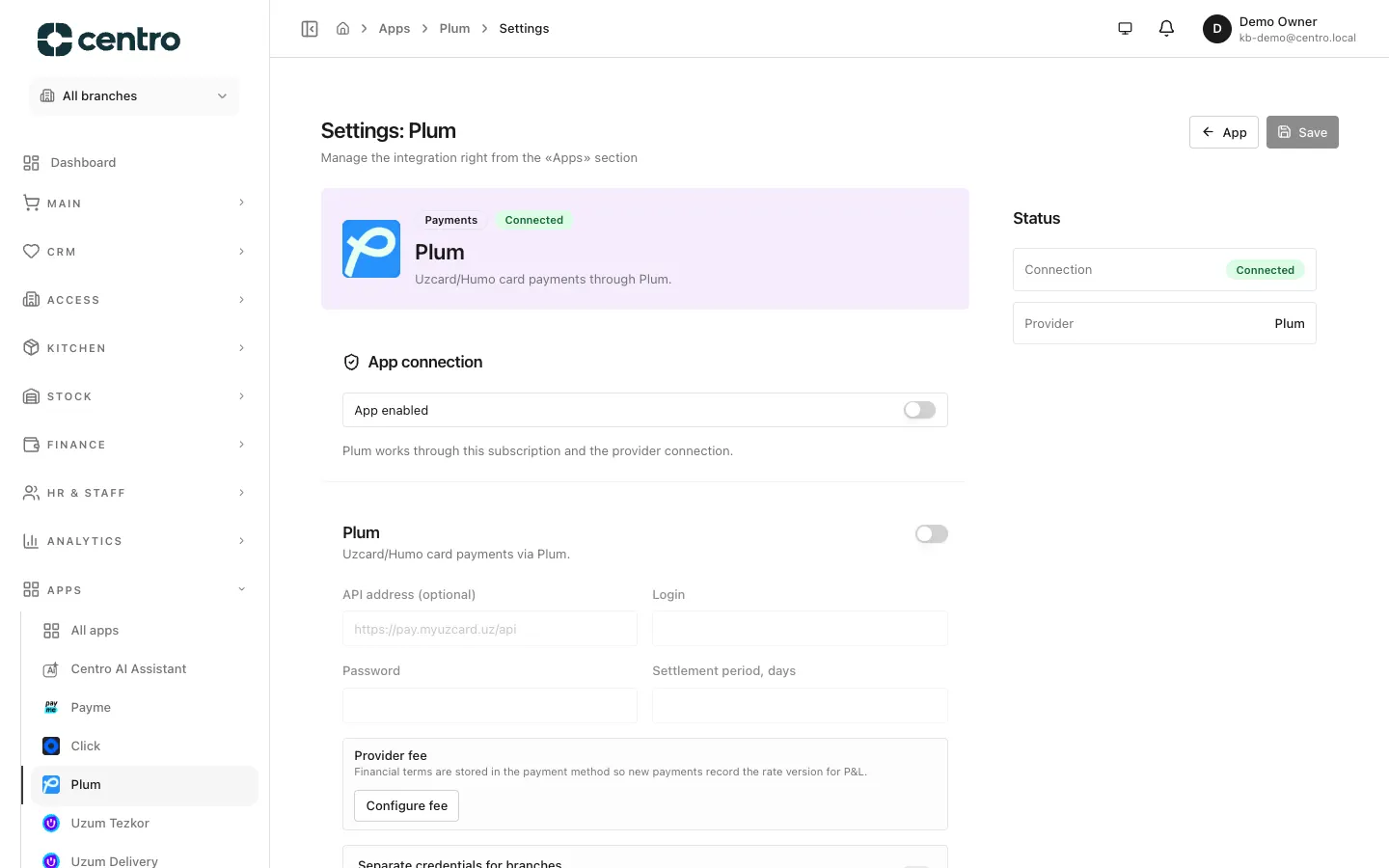
Top of the page
- «Settings: Plum»
- The title. Below it is the app card: category («Payments»), the status badge (usually «Connected») and the catalog description.
- «App»
- Back to the Plum app page (price, connecting and disabling).
- «Save»
- Active only when something has changed. One click saves both the connection and any unsaved branch credentials. On success you see «Integration settings saved».
- «Status»
- The block on the right: «Connection» is the app’s catalog status, «Provider» is the provider name.
- «App connection» → «App enabled»
- The master switch of the whole provider. When off, the connection is saved as «inactive» and no payments go through this provider — whatever the products and branch keys say (the server uses a product only if «app enabled AND product enabled AND branch enabled»).
Product card
- Switch in the card header
- Turns this product on or off. A product that is off is dimmed and its fields cannot be edited.
- «API address (optional)»
- Leave it empty to use Plum’s standard address. If filled, it must look like https://…, otherwise saving fails with «Enter an address like https://… or leave the field empty».
- «Login», «Password»
- The credentials of the Plum cabinet. The password is hidden after saving.
- «Settlement period, days»
- How many days the provider takes to transfer the money to your account (per your contract). Stored with the connection as a reference value.
- «Provider fee» → «Configure fee»
- The fee is not stored here but in the payment method under «Settings → Payments»: every new payment remembers the rate version in force, so the fee expense in the P&L stays correct even after the rate changes. The button opens that product’s page.
- «Separate credentials for branches»
- When on, the product works only with the branches’ own keys: the shared fields above are locked and the server ignores them. A collapsible «Branch credentials» block appears below — for every active branch its own switch («On for this branch» / «Off for this branch»), its own fields (e.g. «Merchant ID», «Secret Key (key from your account)»; a saved key shows «(saved — leave empty to keep it)») and, for Payme, «Webhook URL for this branch’s account». Unsaved branch changes are marked «Unsaved» and are saved by the common «Save» button.
Tip: A saved secret key or password is never shown again — the field shows only its first and last characters with dots (e.g. «de••••al»). If you leave the field untouched or empty, the old value is kept; it is replaced only when you type a new one.