«Get started with Centro»
The required setup checklist above the metrics: progress, the next step and links to the right sections.
The block is shown to accounts that can read system settings. The steps are checked automatically from the data (for example, «Create a venue» counts as done once there is at least one active venue); nothing has to be ticked by hand. This checklist follows the questionnaire filled in right after registration — see «First-run setup (onboarding)» for that.
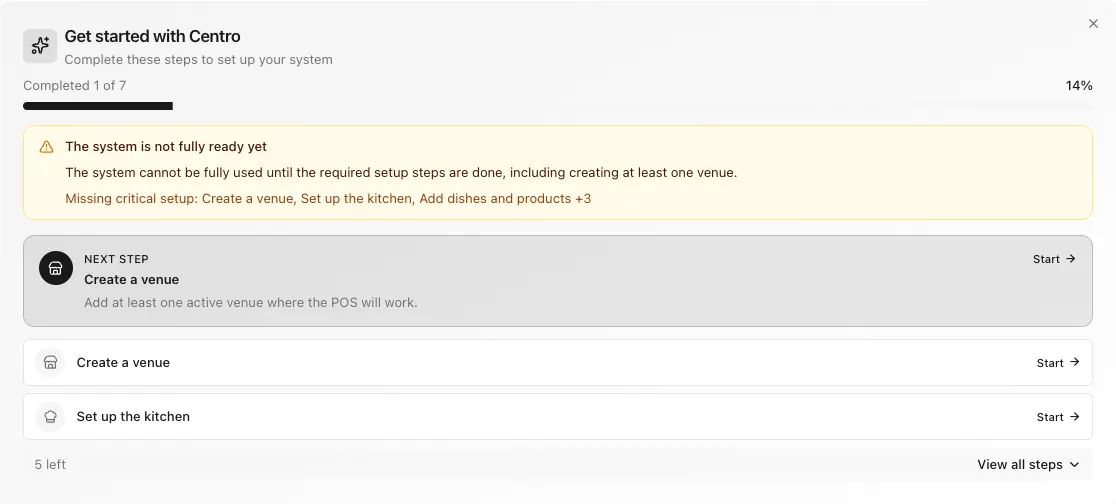
- Progress
- «Completed X of Y» and a percentage — only required steps count.
- «The system is not fully ready yet»
- A yellow warning while required steps remain; «Missing critical setup:» — three unfinished steps and the number of the rest (+N).
- «Next step»
- The first unfinished step: its name, description and a button («Start», «Continue» or «Review») that opens the right section. Two more steps follow below.
- «View all steps»
- The full list: required steps carry a «Required» badge, finished ones are struck through and not clickable. «N left» — how many steps remain; «Collapse» closes the list.
- ✕
- Hides the block until the page reloads; if steps remain, it comes back.
Only: Restaurant
Restaurant steps
- «Create a venue» — «Access» → «Venues» → a new venue.
- «Set up the kitchen» — kitchen stations.
- «Create menu categories» and «Add dishes and products».
- «Set up tables and the hall» — the floor plan.
- «Create cash registers» and «Add employees».
- «Set up taxes» — optional, the button reads «Review».
Only: Store
Store steps
- «Create a store» — an active sales point.
- «Create the catalog» and «Add product categories» — both are done as soon as there is at least one category.
- «Add products».
- «Set up stock accounting» — opening balances (stocktake).
- «Create cash registers», «Add employees», «Set up taxes» (optional).
Only: Car wash
Car-wash steps
- «Create a car wash» — an active location that receives cars.
- «Create service categories».
- «Add services» — service recipe cards with prices: they appear in the mobile app and the POS.
- «Create cash registers», «Add employees» (washers and administrators), «Set up taxes» (optional).
Tip: When all required steps are done the block shows «Congratulations! You completed all tasks!» — only once in this browser, after that the block is not shown. The payment-methods step is not shown in this block and does not count.