Billing overview
The current plan and its status, the next charge, amounts due, payment method, subscription, latest invoices and limits on one page.
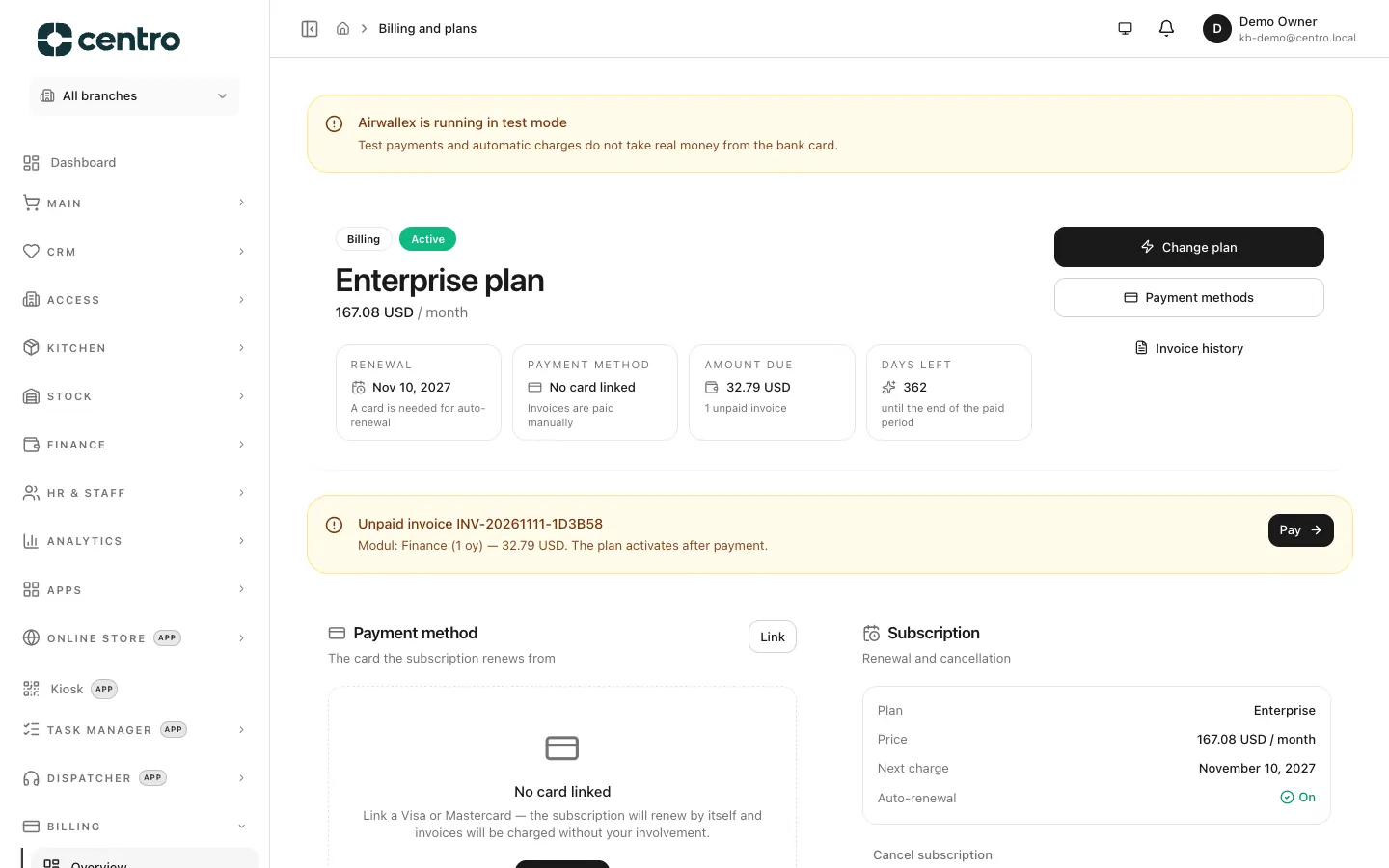
Open in the admin panel/billing This is where you pay for Centro itself: which plan your organization is on, until when it is paid and whether anything is due. Payments from your own customers are not here — they are in «Finance». At the top: the «Billing» badge and the subscription status («Active», «Trial», «Past due», «Auto-renewal off», «Canceled», «Trial expired», «Expired»), the title «{name} plan», and the price and period below it. The price usually depends on the number of locations: «Per location».
How to open
- In the sidebar, expand Billing and click Overview.
The four tiles
- «Renewal»
- The next key date with a hint: «Renews automatically» (card on file), «A card is needed for auto-renewal» (no card), «Active until this date, then it stops» (renewal off), on a trial — «End of the trial period». In test mode — «Airwallex is in test mode — no real charge».
- «Payment method»
- The linked card (scheme and last 4 digits) or «No card linked» — then «Invoices are paid manually».
- «Amount due»
- The total and number of all unpaid and failed invoices, or «Nothing owed».
- «Days left»
- Days left until the paid (or trial) period ends.
Buttons and alerts
- «Change plan» («Choose a plan» when the subscription has stopped) opens the plans page; «Payment methods» and «Invoice history» open those pages.
- The amber «Airwallex is running in test mode» — the payment system is in test mode and no real money is charged (as in the demo environment).
- «Unpaid invoice INV-…» — the first unpaid invoice: its description, amount and a «Pay» button (plus «Charge the card» when a card is saved). In the demo organization it is the pending invoice for the Finance module.
- The red «The trial period has ended» / «The subscription has expired» and the amber trial countdown — see «Trial, expiry and payment reminders».
The cards below
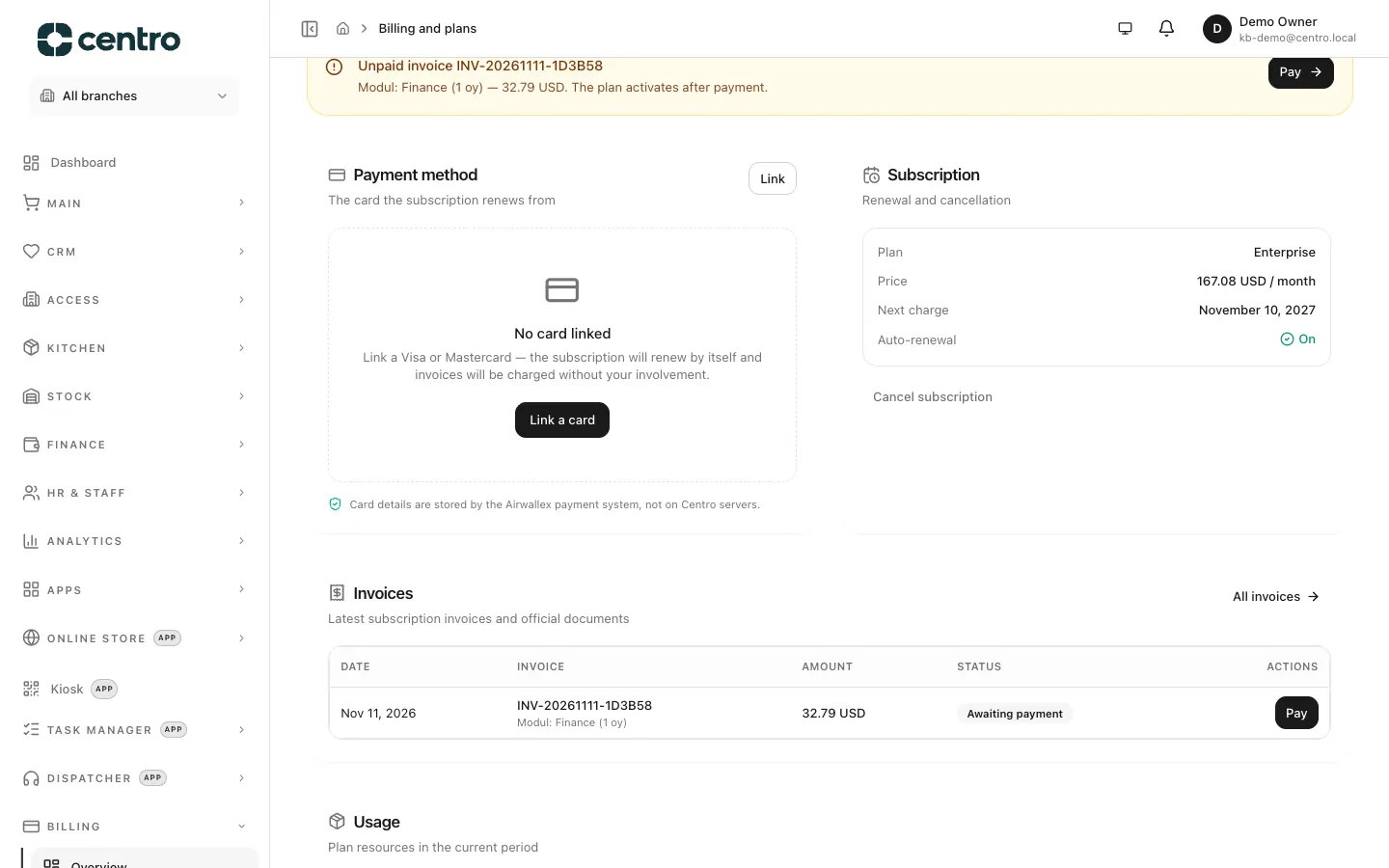
- «Payment method»
- The card the subscription renews from, «Change» / «Link» and «Remove». Without a card — «Link a card». Card details are stored by Airwallex, not by Centro.
- «Subscription»
- «Plan», «Price», «Next charge» (or «Valid until» / «Trial period until»), «Scheduled change» (when a move to a cheaper plan is scheduled) and «Auto-renewal»: «On» / «Off».
- «Invoices»
- The latest 5 invoices: «Date», «Invoice», «Amount», «Status», «Actions» («Pay», or «View» and PDF for paid ones). «All invoices» opens the full history.
The old plans and the «base + modules» tariff #
Which scheme your organization is on, how to tell, and how the two differ.
Centro has two payment schemes. The old plans («Free trial», «Starter», «Business», «Enterprise» and others) stay with organizations registered before the new tariff was launched: everything works for them as before, and that scheme is what the other topics of this section describe. The «base + modules» tariff goes to organizations registered after the launch: first a free trial with every module open, then a low-priced base for the business type plus only the modules you need. Centro picks the scheme by registration date and it cannot be switched in the panel: old organizations are not shown the new tariff, and the new scheme cannot buy an old plan.
The base by business type
- «Restaurant» (restaurants and car washes) — per venue a month (now $15); one register is included in every venue, each extra one is paid separately. The base has 150 items (products and recipes together) and 2 admin panel users.
- «Shop» — one monthly price for the organization (now $23); the first register is included, each next one is $13 a month. Limits: 5,000 products, 10 employees, 5,000 customers. Kitchen screens are not sold to shops.
- The standard level of inventory and finance (basic inventory and «Finance Standard») is part of the base; their Pro level and everything else (Inventory Pro, Finance Pro, staff, delivery, marketing, the online store and so on) is a separate module. Fiscalization and the open API are not sold yet. One venue can be opened during the free trial.
How to tell which scheme you are on
- On the new tariff the Billing → Plans page is called «Your tariff» and shows one base with modules; on the old one it is «Pricing plans» with plan cards.
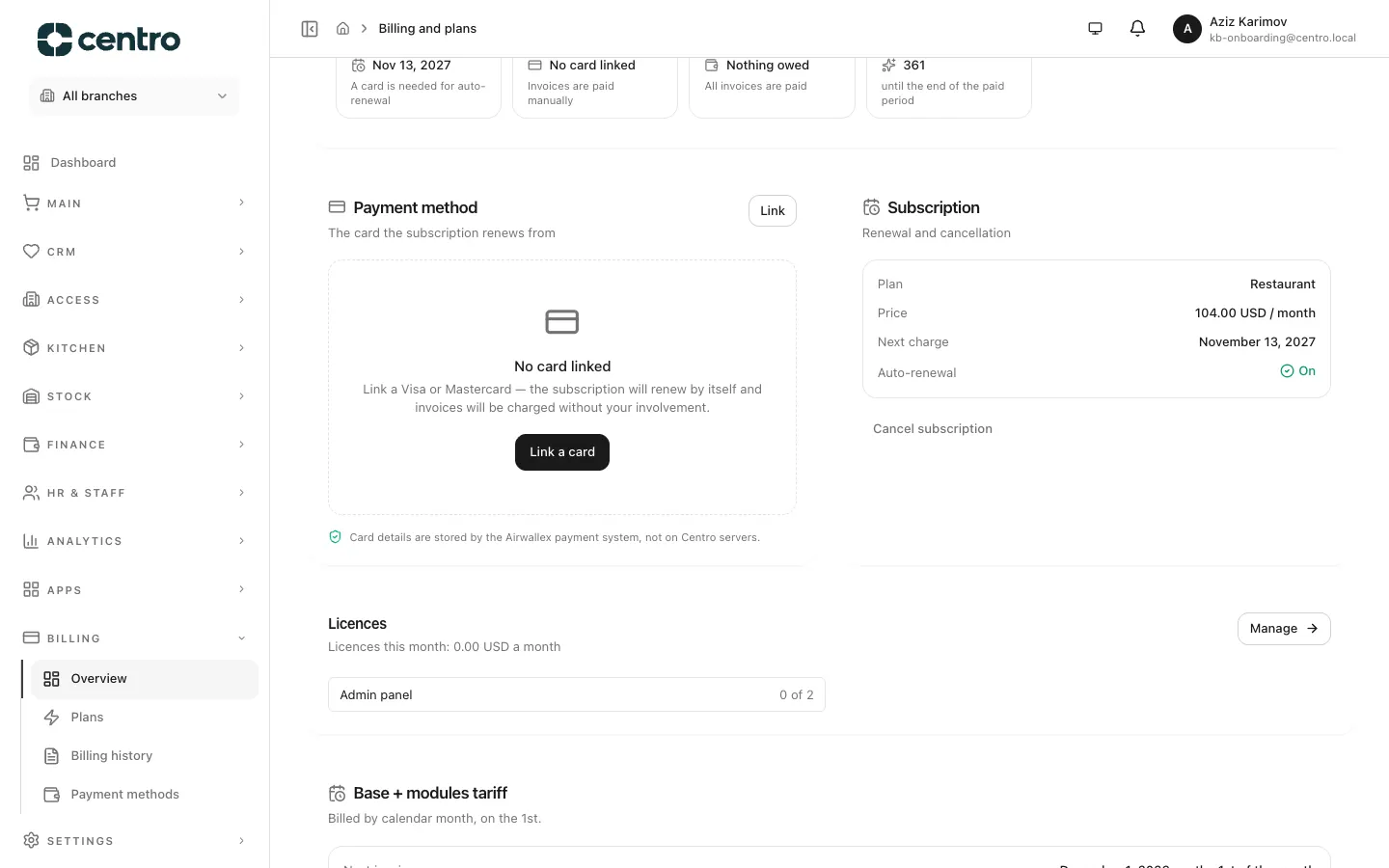
- On the new tariff the billing overview has the «Licences» and «Base + modules tariff» cards.
- On an old plan the «Licences» page says «Licences are not used on your tariff».
How the schemes differ
- Billing period
- Old: 1–36 months or 1–3 years in one invoice, the period counts from the payment date. New: the calendar month — the first payment covers the days left in this month, then the 1st of every month; or a year (12 months for the price of 10).
- Devices and apps
- Old: the number of places in the plan configuration. New: licences — the owner assigns each one to a specific employee or device (see the «Licences» page).
- Limits
- Old: a limit grows with a higher plan. New: a limit grows with a limit pack; the venue limit of the trial grows only with a paid tariff.
- Modules
- Old: an add-on module is paid separately with its own term. New: a module is part of the monthly subscription — the days left in this month, then on the 1st together with everything else.
- Canceling
- Old: at the end of the period, or now with a refund of the rest. New: only at the end of the paid month, no refund.
The overview on the «base + modules» tariff #
Trial banners, the «Licences» and «Base + modules tariff» cards, the venue limit, packs and canceling.
For an organization on the new tariff the overview is the same page, but a few blocks differ. They show only on the new tariff; for an organization on an old plan the page stays as it was.
- «Free trial until …» / «The free trial has ended»
- During the trial every module is open and licences cost nothing. The Choose your tariff button opens the checkout on the tariff page right away. After it ends: «Choose your modules and pay. Devices and staff are taken from your licences».
- «Licences»
- The monthly amount of this month’s licences («Licences are free during the trial period.» on the trial) and «assigned of total» per kind. Manage opens the «Licences» page.
- «Base + modules tariff»
- Shown on a paid tariff: «Next invoice» (the 1st of the month), «Your configuration» — what a month costs from the next 1st, and «Licence charges for the next invoice» — licences assigned during the month above what was bought: for whom, which days and the amount. They go into the invoice of the 1st, or are invoiced separately at once when the sum reaches the threshold.
- «Usage»
- «Venues» are counted instead of locations — venues only (not the branch or warehouses). When a resource nears its limit, the recommended pack and a Buy pack button appear under the card; the button opens the checkout with the pack already added.
- «Cancel subscription»
- The dialog has only the «At the end of the paid period» option: «On this tariff the paid month is not refunded: access stays until …». Confirm with «Cancel renewal».
Tip: One venue can be opened during the free trial. Creating a second one, the form says «Your tariff's venue limit is reached. Choose a paid tariff in Billing to open more venues.» — no pack adds venues.
Limits: what is counted and what happens at the limit #
The «Usage» block, hard and soft limits, the warning threshold and plan recommendations.
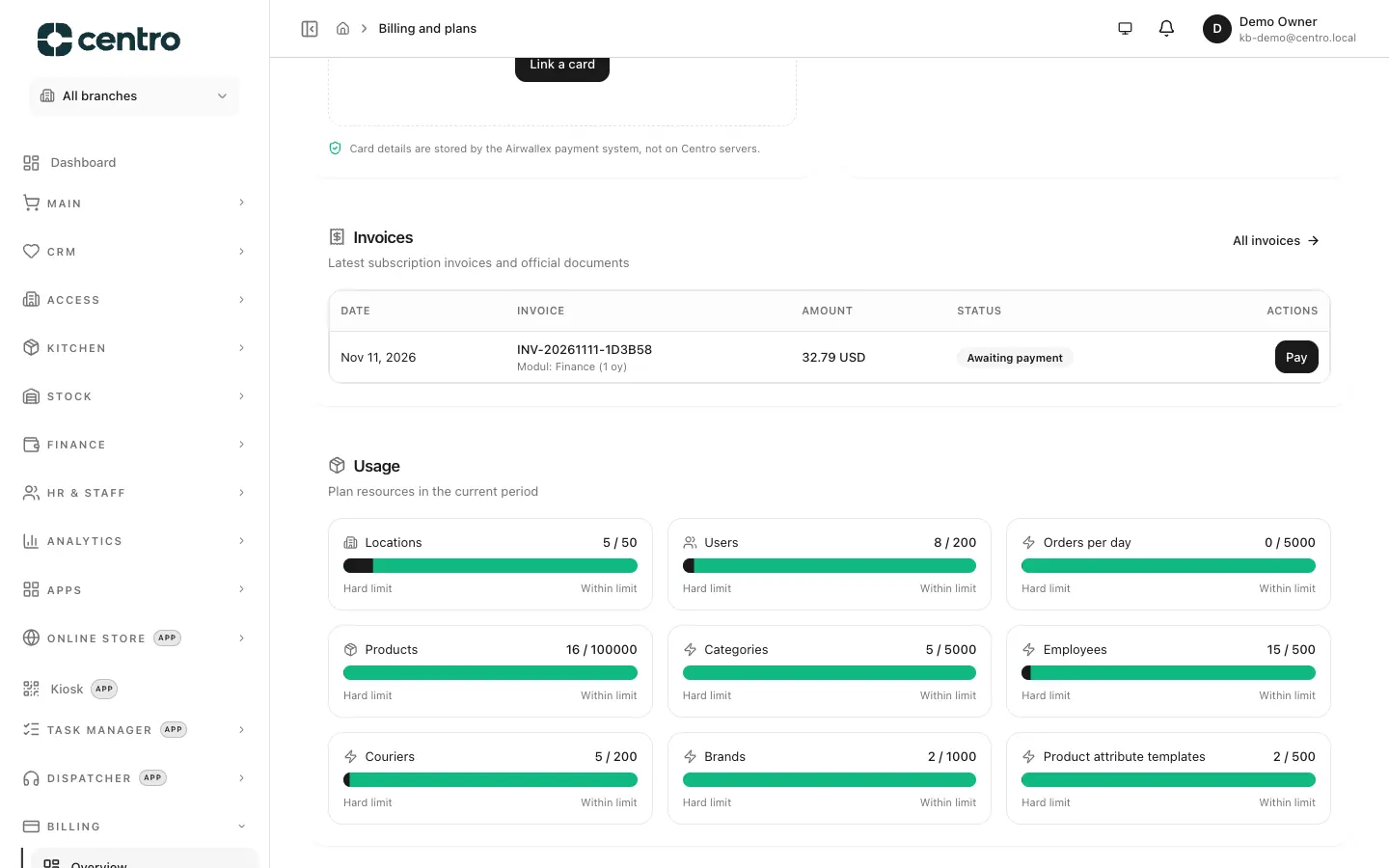
Every plan has limits (quotas) on resources. In the «Usage» block each resource is a card: its name, «used / limit» (∞ when unlimited) and a progress bar. The resources are «Locations», «Users», «Orders per day», «Products», «Categories», «Employees», «Couriers», «Brands» and «Product attribute templates». «Orders per day» counts today (in the organization’s time zone); the others count what exists now.
What the card shows
- Bar colour
- Green — within the limit; amber — usage reached the warning threshold (set per resource in the plan, e.g. 90 % or 95 %); red — the limit is exceeded.
- «Hard limit» / «Soft limit»
- With a hard limit nothing new can be created once it is reached. A soft limit only warns and does not block work.
- «Within limit» / «Almost used up» / «Exceeded»
- The same state as the bar colour, in words.
What happens when a hard limit is reached
- Saving a new location, user, product, category, employee, courier, brand or attribute template is rejected: the system says the plan limit is reached and a higher plan is needed.
- When the orders-per-day limit is used up, no new order can be created until the end of that day (server message: «Kunlik buyurtma limiti tugagan»). The count starts from zero the next day.
- Existing data is not deleted and keeps working — only adding new items stops. Remove the extra items and you can add again.
- Switching to a higher plan raises the limits right away (after payment).
The «Plan recommendations» block appears when a resource reaches its warning threshold or exceeds the limit: «current plan → recommended plan» and «resource: used / limit». The check mark marks it as read, the cross hides it. A recommendation changes nothing by itself.
Tip: In the demo organization every resource is green: for example, 5 of 50 locations and 8 of 200 users are used.
Tip: On the «base + modules» tariff a limit grows with a limit pack, not a higher plan: on a refusal the «Tariff limit reached: …» strip with a Buy pack button appears at the top of the page (see «The «Module not connected» and «Tariff limit reached» strips»).
Trial, expiry and payment reminders #
How long the trial lasts, what happens at the end of a paid period and the 3-day grace period.
Trial period
- The «Free trial» plan starts without a card and lasts the number of days set in the plan (currently 7). During that time the page shows «The trial period ends in N days» with a «Choose a plan» button.
- When the trial ends there is no grace period: the title becomes «No plan selected», «The trial period has ended» appears, and POS terminals and staff mobile apps are blocked until you subscribe. Your data is kept.
When a paid period ends
- With auto-renewal on and a card linked, the default card is charged on the period end date (the next saved card if it fails) and a new period starts.
- Without a card an invoice is issued for the new period and must be paid manually (see «How to pay an invoice»).
- After the due date there are 3 days of grace — the system keeps working. If it is still unpaid, the subscription stops: «The subscription has expired» appears and POS terminals and staff mobile apps are blocked. A subscription with auto-renewal off stops exactly at the end of the period, without grace.
- A separately paid module (e.g. Finance) follows its own term: if it is not paid, only that module closes.
Reminder strip. Three days before the period of an unpaid invoice starts, a strip appears at the top of every admin page: «Payment due in N days», on the due day — «Payment due today», during the 3 grace days — «Payment overdue… Access stops in N days», and then a red «Access stopped». Clicking the strip opens the invoice history.
Tip: The demo organization’s Finance module invoice starts its period on 10 November 2027, so there is no strip now — it appears only 3 days before the due date.
Canceling the subscription and auto-renewal #
Two ways: stop at the end of the period or now with a refund of the balance; turning renewal back on.
The «Cancel subscription» button in the «Subscription» card is shown only while auto-renewal is on. It opens a dialog with two options:
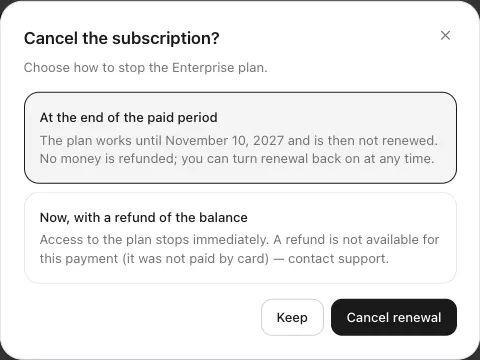
- «At the end of the paid period»
- The plan works until the paid date and is then not renewed. No money is refunded. The confirm button is «Cancel renewal». Afterwards the status becomes «Auto-renewal off» and a «Turn on auto-renewal» button appears — you can press it at any time before the period ends.
- «Now, with a refund of the balance»
- Access to the plan stops immediately. The dialog calculates how much will be refunded to the card for the unused days. If the payment was not made by card, no refund is available — contact support. The confirm button is «Stop and refund».
Important: On a live business the «Now» option stops POS terminals and staff apps immediately. «Keep» closes the dialog without changes.
Tip: On the «base + modules» tariff there is no «Now» option: the subscription stops only at the end of the paid month, with no refund (see «The overview on the «base + modules» tariff»).