How to turn the section on
Analytics is in every plan; the «AI reports» item appears only while the Centro AI Assistant app is active.
«Basic reports» are in every plan, «Advanced analytics» in «Business», «Enterprise» and the trial. The Analytics group in the menu is not hidden by the plan; the exception is «AI reports».
Menu item — what an employee needs
- Executive
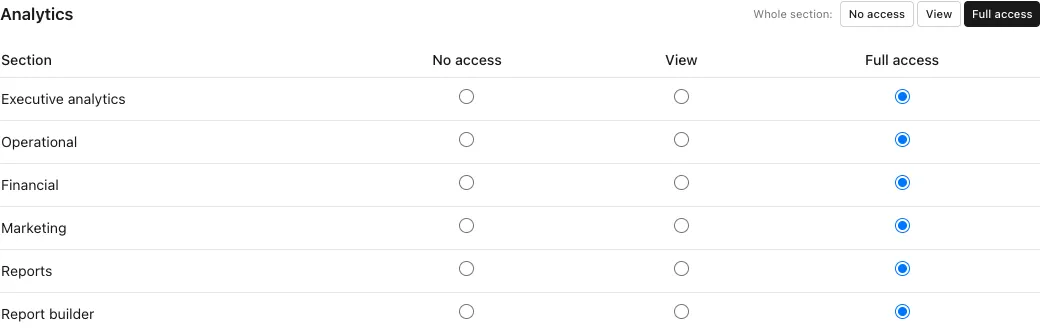
- The «Executive analytics» permission in the «Analytics» group — at least «View».
- Operational
- The «Operational» permission in the «Analytics» group — at least «View».
- Financial
- The «Financial» permission in the «Analytics» group — at least «View».
- Marketing
- The «Marketing» permission in the «Analytics» group — at least «View».
- Reports, Saved
- The «Reports» permission in the «Analytics» group — at least «View».
- Builder
- The «Report builder» permission in the «Analytics» group — at least «View».
- AI reports
- The «Report builder» permission in the «Analytics» group — at least «View». In addition, the Centro AI Assistant app must be «Active» in Apps. Asking questions needs «Full access».
How to turn on AI reports
- Open the Centro AI Assistant card in Apps → All apps (or Billing → Plans → Additional modules → «Centro AI Assistant» → «Connect»).
- The app has no trial (29 USD per month): «Buy» → choose the term on the «Module payment» page and pay the invoice.
- After payment the app becomes «Active» and the «AI reports» item appears in Analytics.
Tip: The «AI reports» menu item is tied specifically to the Centro AI Assistant app; that app includes a monthly token package.
How to give an employee access
- Open Access → Positions (this item is visible only to the organization owner) and open the employee’s position for editing.
- In the «Admin panel access» block find the «Analytics» group and choose «View» (read only) or «Full access» (create and change) in the rows you need.
- Press «Save changes».
- The employee reloads the page and the items appear in the menu. With «No access» the item is hidden, and a direct link to the page redirects to the first available page of the menu (usually «Dashboard»).